The delivery deadline was a week away, and I’d just received feedback that the flip card interaction in Rise wasn’t cutting it. The client wanted something more polished with smoother animations and better visuals.
Years ago, I’d built a flip card interaction in Storyline 360 but tweaking it now would mean hours of adjusting triggers and states across the multiple flip cards. That kind of rework just didn’t make sense in the little time remaining and would make it inflexible to any additional client requests.
Instead, I leaned on something I’d recently been experimenting with: LLMs and web objects.
I opened Claude Sonnet and typed:
“You are a UI/UX expert and master of vanilla HTML/JS/CSS. Create a flip card interaction with a smooth rotation effect. Make it snappy and fun to use, and ask me questions about color palette, visual design, and functionality.”
After several minutes of iterations, I had a custom flip card interaction that looked exactly how I imagined it. The animation was smoother than anything I could have done natively in Storyline, and every visual detail was under my control.
And when the client feedback came in later that week? The changes that would have taken 20+ minutes per flip card interaction in storyline were all handled in minutes through simple conversation. I described the edits and Claude updated the code, which I dropped right back into Storyline. Easy.
From Idea to Polished Interaction
Here’s the full workflow I now use to create Rise-ready custom interactions — no advanced coding needed:
- Describe the interaction to an LLM like Claude or ChatGPT.
- Refine the output through chat.
- Tweak the animation speed, shadows, borders, or layout with simple prompts. The LLM handles the code — you focus on the design.
- Test the result by opening the HTML file in a browser.
- Load into Storyline as a web object. No layers, no states, no triggers to manage.
- Export to Review 360, then embed in Rise using a Storyline block.
That’s it. You’ve now built a custom, flexible interaction that looks great and integrates directly into your Rise course — with none of the usual limitations or adjustment frustrations.
Why Not Just Use Storyline or Rise?
For years, instructional designers faced a frustrating choice:
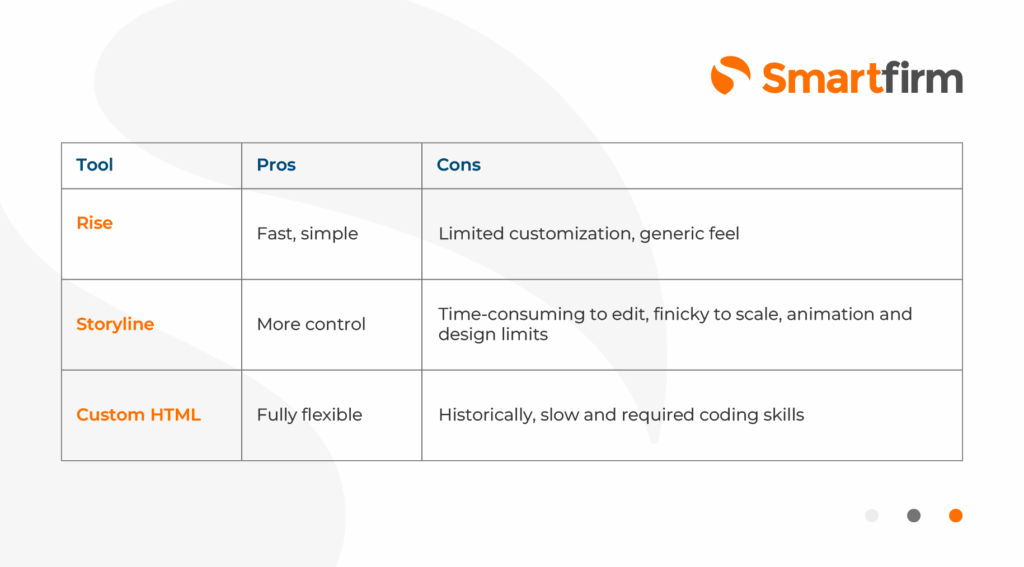
LLMs collapse that trade-off. You get the unlimited customization of HTML with development speed that matches or beats Storyline.
A Painful Example: Text Updates in Storyline
Storyline interactions often break when you change text length, adjust sizes, or modify base designs. Want to update the font size on your flip cards? You might need to adjust multiple layers, reposition elements, and test across different states. There’s no system for maintaining complex margins or padding relationships – every change requires manual tweaks in multiple places.
HTML was built for these relationships. Margins, padding, and responsive design are native concepts. When an LLM builds your interaction, it structures these relationships properly from the start.
The more you understand HTML and CSS concepts, the faster you can guide the LLM toward exactly what you want. But even without technical knowledge, you can describe visual concepts and watch them take shape.
Real Projects, Real Results
Here are a few custom blocks we’ve built recently using this workflow:
- Flip cards (click for demo!) with crisp 3D animations and stylized front/back designs
- Tab interaction (click for demo!) with hover-to-switch functionality and sliding content
- Popups (click for demo!) with smooth transition animations and a quick navigation system
Every one of them is:
- Self-contained (no external assets)
- Easy to update
- Smoothly embedded in Rise using a Storyline block
There’s no deployment headache. No server uploads. Just open, test, drop in.
The Shift: From Builder to Director
I’m finding this new workflow faster, but also more freeing.
I’m no longer bogged down in layer management or hit with late-stage client tweaks that blow up timelines. Instead, I describe the experience, guide the LLM, and refine through iteration. I’m able to achieve high-quality, maintainable interactions that impress clients and actually fit within a project schedule.
Instructional designers are stepping into a new role — directors of digital learning experiences. The LLM builds, you test, you refine: “Make the rotation slower and add a subtle shadow effect.”
Unlike Storyline, where changes ripple through multiple layers and states, HTML updates happen in context. Relationships between elements are maintained as the LLM implements changes.
Integration With Your Existing Workflow
These HTML interactions work within your current tools. Load them into Storyline as web objects for direct use, or upload to Review 360 and use them in Rise by inserting a Storyline block.
Match your interaction dimensions to your slide or content area for seamless integration. The responsive nature of well-built HTML adapts to different screen sizes automatically.

Try It Yourself
If you’ve ever hit the limits of Rise or struggled with the rigidity of Storyline, give this approach a shot:
- Open Claude, ChatGPT, or another LLM that supports artifacts/code.
- Ask for a flipcard, slider, or scenario interaction — whatever you need.
- Request it as a single HTML file with base64 images.
- Load into Storyline, export, embed in Rise.
At Smartfirm, this workflow has become a core part of how we deliver flexible, engaging eLearning solutions. Two years ago, these kinds of interactions would’ve taken too long or cost too much to be viable. Now, they’re fast, adaptable, and surprisingly fun to build.
The tools exist, the process works, and the learning curve is manageable. The main requirement is willingness to think differently about how custom interactions get built.